

Installing Exchange, whether is its Exchange 2016/2019 or SE, takes time getting the ground work done to get to the point of installing Exchange.
I wanted to automate this so that all prerequisites are done automatically and everything else is also done.
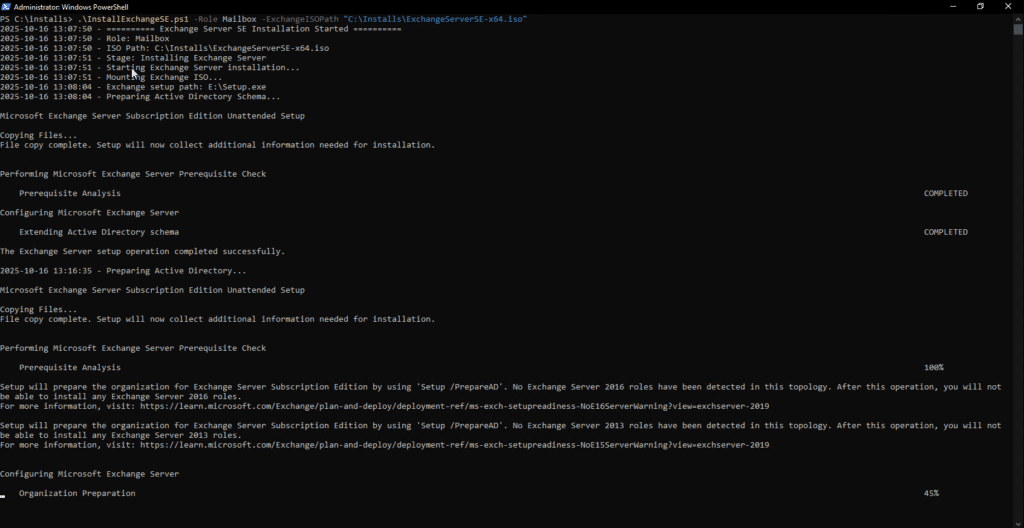
What this script does not do is create the VM, change the computer name etc. That you still need to do manually. Here is what the installer looks like with the automation.
Script
The script is straight forward and you can modify the installation path and where it saves the config file etc.
#Requires -RunAsAdministrator
<#
.SYNOPSIS
Automated Exchange Server Subscription Edition Installation Script
.DESCRIPTION
Installs prerequisites, Windows updates, and Exchange Server SE with auto-resume capability
.PARAMETER Role
Exchange role to install: Mailbox or ManagementTools
.PARAMETER ExchangeISOPath
Path to Exchange Server SE ISO file
.PARAMETER TargetInstallPath
Installation path for Exchange Server (default: C:\Program Files\Microsoft\Exchange Server\V15)
.PARAMETER ExchangeUpdatePath
Path to Exchange Update file (optional)
.PARAMETER ResetState
Reset the installation state and start fresh
#>
param(
[Parameter(Mandatory=$true)]
[ValidateSet("Mailbox","ManagementTools")]
[string]$Role,
[Parameter(Mandatory=$true)]
[string]$ExchangeISOPath,
[string]$TargetInstallPath = "C:\Program Files\Microsoft\Exchange Server\V15",
[Parameter(Mandatory=$false)]
[string]$ExchangeUpdatePath,
[Parameter(Mandatory=$false)]
[switch]$ResetState
)
# Configuration
$ScriptPath = $MyInvocation.MyCommand.Path
$LogFile = "C:\ExchangeInstall\InstallLog.txt"
$StateFile = "C:\ExchangeInstall\InstallState.json"
$AutoLoginKey = "HKLM:\SOFTWARE\Microsoft\Windows NT\CurrentVersion\Winlogon"
# Create install directory
New-Item -Path "C:\ExchangeInstall" -ItemType Directory -Force | Out-Null
# Logging function
function Write-Log {
param(
[string]$Message,
[string]$Level = "INFO"
)
$timestamp = Get-Date -Format "yyyy-MM-dd HH:mm:ss"
$logMessage = "$timestamp - [$Level] - $Message"
$logMessage | Tee-Object -FilePath $LogFile -Append
# Color code console output
switch ($Level) {
"ERROR" { Write-Host $logMessage -ForegroundColor Red }
"WARNING" { Write-Host $logMessage -ForegroundColor Yellow }
"SUCCESS" { Write-Host $logMessage -ForegroundColor Green }
default { Write-Host $logMessage }
}
}
# Save installation state
function Save-State {
param(
[string]$Stage,
[hashtable]$CompletedSteps = @{}
)
$stateData = @{
Stage = $Stage
Role = $Role
ExchangeISOPath = $ExchangeISOPath
TargetInstallPath = $TargetInstallPath
ExchangeUpdatePath = $ExchangeUpdatePath
ScriptPath = $ScriptPath
CompletedSteps = $CompletedSteps
LastUpdate = (Get-Date).ToString()
}
$stateData | ConvertTo-Json | Set-Content $StateFile
Write-Log "State saved: $Stage"
}
# Load installation state
function Get-State {
if (Test-Path $StateFile) {
$state = Get-Content $StateFile | ConvertFrom-Json
# Convert CompletedSteps back to hashtable
if ($state.CompletedSteps) {
$completedHash = @{}
$state.CompletedSteps.PSObject.Properties | ForEach-Object {
$completedHash[$_.Name] = $_.Value
}
$state.CompletedSteps = $completedHash
} else {
$state | Add-Member -NotePropertyName CompletedSteps -NotePropertyValue @{} -Force
}
return $state
}
return $null
}
# Mark a step as completed
function Mark-StepCompleted {
param([string]$StepName)
$State = Get-State
if ($null -eq $State) {
$State = [PSCustomObject]@{
Stage = "Initial"
CompletedSteps = @{}
}
}
if ($null -eq $State.CompletedSteps) {
$State.CompletedSteps = @{}
}
$State.CompletedSteps[$StepName] = $true
# Preserve the current stage when saving
$currentStage = if ($State.Stage) { $State.Stage } else { "Initial" }
Save-State -Stage $currentStage -CompletedSteps $State.CompletedSteps
Write-Log "Step completed and saved: $StepName" "SUCCESS"
}
# Check if a step is completed
function Test-StepCompleted {
param([string]$StepName)
$State = Get-State
if ($null -eq $State -or $null -eq $State.CompletedSteps) {
return $false
}
$completed = $State.CompletedSteps.ContainsKey($StepName) -and $State.CompletedSteps[$StepName]
return $completed
}
# Configure auto-login and script execution on startup
function Set-AutoLogin {
param([string]$Username, [string]$Password, [string]$NextStage)
# Set auto-login
Set-ItemProperty -Path $AutoLoginKey -Name "AutoAdminLogon" -Value "1"
Set-ItemProperty -Path $AutoLoginKey -Name "DefaultUsername" -Value $Username
Set-ItemProperty -Path $AutoLoginKey -Name "DefaultPassword" -Value $Password
Set-ItemProperty -Path $AutoLoginKey -Name "AutoLogonCount" -Value "1"
# Set script to run on startup
$RunOncePath = "HKLM:\Software\Microsoft\Windows\CurrentVersion\RunOnce"
$Command = "powershell.exe -ExecutionPolicy Bypass -File `"$ScriptPath`" -Role $Role -ExchangeISOPath `"$ExchangeISOPath`" -TargetInstallPath `"$TargetInstallPath`""
if ($ExchangeUpdatePath) {
$Command += " -ExchangeUpdatePath `"$ExchangeUpdatePath`""
}
Set-ItemProperty -Path $RunOncePath -Name "ExchangeInstall" -Value $Command
Save-State $NextStage
Write-Log "Auto-login configured for next reboot"
}
# Disable auto-login
function Disable-AutoLogin {
Remove-ItemProperty -Path $AutoLoginKey -Name "AutoAdminLogon" -ErrorAction SilentlyContinue
Remove-ItemProperty -Path $AutoLoginKey -Name "DefaultUsername" -ErrorAction SilentlyContinue
Remove-ItemProperty -Path $AutoLoginKey -Name "DefaultPassword" -ErrorAction SilentlyContinue
Remove-ItemProperty -Path $AutoLoginKey -Name "AutoLogonCount" -ErrorAction SilentlyContinue
Write-Log "Auto-login disabled"
}
# Check if software is installed via registry
function Test-SoftwareInstalled {
param(
[string]$DisplayNamePattern
)
$registryKeys = @(
"HKLM:\SOFTWARE\Microsoft\Windows\CurrentVersion\Uninstall\*",
"HKLM:\SOFTWARE\Wow6432Node\Microsoft\Windows\CurrentVersion\Uninstall\*"
)
foreach ($key in $registryKeys) {
$installed = Get-ItemProperty $key -ErrorAction SilentlyContinue | Where-Object { $_.DisplayName -like $DisplayNamePattern }
if ($installed) {
return $installed
}
}
return $null
}
# Install prerequisites
function Install-Prerequisites {
Write-Log "Checking prerequisites installation status..." "INFO"
try {
$PrereqPath = "C:\ExchangeInstall\Prerequisites"
New-Item -Path $PrereqPath -ItemType Directory -Force | Out-Null
# Install required Windows features
if (!(Test-StepCompleted "WindowsFeatures")) {
Write-Log "Installing Windows features..." "INFO"
$Features = @(
"NET-Framework-45-Features",
"RPC-over-HTTP-proxy",
"RSAT-Clustering",
"RSAT-Clustering-CmdInterface",
"RSAT-Clustering-Mgmt",
"RSAT-Clustering-PowerShell",
"Web-Mgmt-Console",
"WAS-Process-Model",
"Web-Asp-Net45",
"Web-Basic-Auth",
"Web-Client-Auth",
"Web-Digest-Auth",
"Web-Dir-Browsing",
"Web-Dyn-Compression",
"Web-Http-Errors",
"Web-Http-Logging",
"Web-Http-Redirect",
"Web-Http-Tracing",
"Web-ISAPI-Ext",
"Web-ISAPI-Filter",
"Web-Lgcy-Mgmt-Console",
"Web-Metabase",
"Web-Mgmt-Console",
"Web-Mgmt-Service",
"Web-Net-Ext45",
"Web-Request-Monitor",
"Web-Server",
"Web-Stat-Compression",
"Web-Static-Content",
"Web-Windows-Auth",
"Web-WMI",
"Windows-Identity-Foundation",
"RSAT-ADDS"
)
$result = Install-WindowsFeature -Name $Features -IncludeManagementTools
if ($result.Success) {
Mark-StepCompleted "WindowsFeatures"
Write-Log "Windows features installed successfully" "SUCCESS"
} else {
Write-Log "Failed to install Windows features" "ERROR"
throw "Windows features installation failed"
}
} else {
Write-Log "Windows features already installed" "INFO"
}
# Install .NET Framework 4.8.1
if (!(Test-StepCompleted "DotNet481")) {
$dotNetKey = Get-ItemProperty -Path "HKLM:\SOFTWARE\Microsoft\NET Framework Setup\NDP\v4\Full" -ErrorAction SilentlyContinue
if ($dotNetKey -and $dotNetKey.Release -ge 533320) {
Write-Log ".NET Framework 4.8.1 or higher already installed (Release: $($dotNetKey.Release))" "SUCCESS"
Mark-StepCompleted "DotNet481"
} else {
Write-Log "Installing .NET Framework 4.8.1..." "INFO"
$NetInstaller = "$PrereqPath\ndp481-x86-x64-allos-enu.exe"
if (!(Test-Path $NetInstaller)) {
Write-Log "Downloading .NET Framework 4.8.1..." "INFO"
Invoke-WebRequest -Uri "https://go.microsoft.com/fwlink/?linkid=2203306" -OutFile $NetInstaller -UseBasicParsing
}
$process = Start-Process -FilePath $NetInstaller -ArgumentList "/q /norestart" -Wait -PassThru
if ($process.ExitCode -eq 0 -or $process.ExitCode -eq 3010) {
Mark-StepCompleted "DotNet481"
Write-Log ".NET Framework 4.8.1 installed successfully" "SUCCESS"
} else {
throw ".NET Framework 4.8.1 installation failed with exit code: $($process.ExitCode)"
}
}
} else {
Write-Log ".NET Framework 4.8.1 already completed" "INFO"
}
# Install Visual C++ Redistributable 2013
if (!(Test-StepCompleted "VCRedist2013")) {
$vcInstalled = Test-SoftwareInstalled "*Visual C++ 2013*x64*"
if ($vcInstalled) {
Write-Log "VC++ 2013 already installed: $($vcInstalled.DisplayName)" "SUCCESS"
Mark-StepCompleted "VCRedist2013"
} else {
Write-Log "Installing VC++ 2013 Redistributable..." "INFO"
$VCRedist = "$PrereqPath\vcredist_x64_2013.exe"
if (!(Test-Path $VCRedist)) {
Write-Log "Downloading VC++ 2013..." "INFO"
Invoke-WebRequest -Uri "https://download.microsoft.com/download/2/E/6/2E61CFA4-993B-4DD4-91DA-3737CD5CD6E3/vcredist_x64.exe" -OutFile $VCRedist -UseBasicParsing
}
$process = Start-Process -FilePath $VCRedist -ArgumentList "/install /quiet /norestart" -Wait -PassThru
if ($process.ExitCode -eq 0 -or $process.ExitCode -eq 3010) {
Mark-StepCompleted "VCRedist2013"
Write-Log "VC++ 2013 installed successfully" "SUCCESS"
} else {
throw "VC++ 2013 installation failed with exit code: $($process.ExitCode)"
}
}
} else {
Write-Log "VC++ 2013 already completed" "INFO"
}
# Install UCMA 4.0
if (!(Test-StepCompleted "UCMA")) {
$ucmaInstalled = Test-SoftwareInstalled "*Unified Communications Managed API*"
if ($ucmaInstalled) {
Write-Log "UCMA 4.0 already installed: $($ucmaInstalled.DisplayName)" "SUCCESS"
Mark-StepCompleted "UCMA"
} else {
Write-Log "Installing UCMA 4.0..." "INFO"
$UCMA = "$PrereqPath\UcmaRuntimeSetup.exe"
if (!(Test-Path $UCMA)) {
Write-Log "Downloading UCMA 4.0..." "INFO"
Invoke-WebRequest -Uri "https://download.microsoft.com/download/2/C/4/2C47A5C1-A1F3-4843-B9FE-84C0032C61EC/UcmaRuntimeSetup.exe" -OutFile $UCMA -UseBasicParsing
}
$process = Start-Process -FilePath $UCMA -ArgumentList "/quiet" -Wait -PassThru
Start-Sleep -Seconds 5
$ucmaVerify = Test-SoftwareInstalled "*Unified Communications Managed API*"
if ($ucmaVerify -or $process.ExitCode -eq 0 -or $process.ExitCode -eq 3010) {
Mark-StepCompleted "UCMA"
Write-Log "UCMA 4.0 installed successfully" "SUCCESS"
} else {
throw "UCMA 4.0 installation failed with exit code: $($process.ExitCode)"
}
}
} else {
Write-Log "UCMA 4.0 already completed" "INFO"
}
# Install IIS URL Rewrite Module
if (!(Test-StepCompleted "IISRewrite")) {
$iisRewriteInstalled = Test-SoftwareInstalled "*URL Rewrite*"
if ($iisRewriteInstalled) {
Write-Log "IIS URL Rewrite already installed: $($iisRewriteInstalled.DisplayName)" "SUCCESS"
Mark-StepCompleted "IISRewrite"
} else {
Write-Log "Installing IIS URL Rewrite Module..." "INFO"
$IISRewrite = "$PrereqPath\rewrite_amd64_en-US.msi"
if (!(Test-Path $IISRewrite)) {
Write-Log "Downloading IIS URL Rewrite..." "INFO"
Invoke-WebRequest -Uri "https://download.microsoft.com/download/1/2/8/128E2E22-C1B9-44A4-BE2A-5859ED1D4592/rewrite_amd64_en-US.msi" -OutFile $IISRewrite -UseBasicParsing
}
$process = Start-Process -FilePath "msiexec.exe" -ArgumentList "/i `"$IISRewrite`" /quiet /norestart" -Wait -PassThru
if ($process.ExitCode -eq 0 -or $process.ExitCode -eq 3010) {
Mark-StepCompleted "IISRewrite"
Write-Log "IIS URL Rewrite installed successfully" "SUCCESS"
} else {
throw "IIS URL Rewrite installation failed with exit code: $($process.ExitCode)"
}
}
} else {
Write-Log "IIS URL Rewrite already completed" "INFO"
}
Write-Log "All prerequisites verified/installed successfully" "SUCCESS"
return $true
}
catch {
Write-Log "Prerequisites installation failed: $($_.Exception.Message)" "ERROR"
Write-Log "Stack trace: $($_.ScriptStackTrace)" "ERROR"
return $false
}
}
# Install Windows Updates
function Install-WindowsUpdates {
Write-Log "Checking Windows Updates..." "INFO"
try {
if (!(Get-Module -ListAvailable -Name PSWindowsUpdate)) {
Write-Log "Installing PSWindowsUpdate module..." "INFO"
Install-PackageProvider -Name NuGet -MinimumVersion 2.8.5.201 -Force
Install-Module -Name PSWindowsUpdate -Force
}
Import-Module PSWindowsUpdate
$updates = Get-WindowsUpdate -MicrosoftUpdate
if ($updates.Count -eq 0) {
Write-Log "No Windows Updates available" "SUCCESS"
return @{UpdatesInstalled = $false; RebootRequired = $false}
}
Write-Log "Found $($updates.Count) updates to install" "INFO"
Get-WindowsUpdate -AcceptAll -Install -AutoReboot:$false
if (Get-WURebootStatus -Silent) {
Write-Log "Windows Updates installed - reboot required" "WARNING"
return @{UpdatesInstalled = $true; RebootRequired = $true}
}
Write-Log "Windows Updates installed successfully" "SUCCESS"
return @{UpdatesInstalled = $true; RebootRequired = $false}
}
catch {
Write-Log "Windows Updates failed: $($_.Exception.Message)" "WARNING"
return @{UpdatesInstalled = $false; RebootRequired = $false}
}
}
# Install Exchange Server
function Install-ExchangeServer {
Write-Log "Starting Exchange Server installation..." "INFO"
try {
$MountResult = Mount-DiskImage -ImagePath $ExchangeISOPath -PassThru
$DriveLetter = ($MountResult | Get-Volume).DriveLetter
$SetupPath = "${DriveLetter}:\Setup.exe"
if (!(Test-Path $SetupPath)) {
throw "Setup.exe not found at $SetupPath"
}
Write-Log "Exchange setup path: $SetupPath" "SUCCESS"
# Prepare AD Schema (Mailbox role only)
if ($Role -eq "Mailbox") {
if (!(Test-StepCompleted "PrepareSchema")) {
Write-Log "Preparing Active Directory Schema..." "INFO"
$process = Start-Process -FilePath $SetupPath -ArgumentList "/PrepareSchema /IAcceptExchangeServerLicenseTerms_DiagnosticDataON" -Wait -PassThru -NoNewWindow
if ($process.ExitCode -eq 0) {
Mark-StepCompleted "PrepareSchema"
Write-Log "Schema prepared successfully" "SUCCESS"
} else {
throw "Schema preparation failed with exit code: $($process.ExitCode)"
}
} else {
Write-Log "Schema already prepared" "INFO"
}
if (!(Test-StepCompleted "PrepareAD")) {
Write-Log "Preparing Active Directory..." "INFO"
$process = Start-Process -FilePath $SetupPath -ArgumentList "/PrepareAD /OrganizationName:`"Exchange Organization`" /IAcceptExchangeServerLicenseTerms_DiagnosticDataON" -Wait -PassThru -NoNewWindow
if ($process.ExitCode -eq 0) {
Mark-StepCompleted "PrepareAD"
Write-Log "AD prepared successfully" "SUCCESS"
} else {
throw "AD preparation failed with exit code: $($process.ExitCode)"
}
} else {
Write-Log "AD already prepared" "INFO"
}
}
# Install Exchange
if (!(Test-StepCompleted "ExchangeInstall")) {
Write-Log "Installing Exchange Server with $Role role..." "INFO"
$Arguments = "/Mode:Install /Role:$Role /InstallWindowsComponents /TargetDir:`"$TargetInstallPath`" /IAcceptExchangeServerLicenseTerms_DiagnosticDataON"
$process = Start-Process -FilePath $SetupPath -ArgumentList $Arguments -Wait -PassThru -NoNewWindow
if ($process.ExitCode -eq 0) {
Mark-StepCompleted "ExchangeInstall"
Write-Log "Exchange Server installed successfully" "SUCCESS"
} else {
throw "Exchange installation failed with exit code: $($process.ExitCode)"
}
} else {
Write-Log "Exchange Server already installed" "INFO"
}
Dismount-DiskImage -ImagePath $ExchangeISOPath
Write-Log "Exchange Server installation process completed" "SUCCESS"
return $true
}
catch {
Write-Log "Exchange Server installation error: $($_.Exception.Message)" "ERROR"
try { Dismount-DiskImage -ImagePath $ExchangeISOPath -ErrorAction SilentlyContinue } catch {}
return $false
}
}
# Get latest Exchange Update
function Get-LatestExchangeUpdate {
Write-Log "Checking for Exchange update..." "INFO"
$UpdatePath = "C:\ExchangeInstall\Updates"
New-Item -Path $UpdatePath -ItemType Directory -Force | Out-Null
if ($ExchangeUpdatePath -and (Test-Path $ExchangeUpdatePath)) {
Write-Log "Using provided update: $ExchangeUpdatePath" "INFO"
return $ExchangeUpdatePath
}
$UpdateFiles = Get-ChildItem -Path $UpdatePath -Filter "*.exe" -ErrorAction SilentlyContinue | Sort-Object LastWriteTime -Descending
if ($UpdateFiles -and $UpdateFiles.Count -gt 0) {
$LatestUpdate = $UpdateFiles[0].FullName
Write-Log "Found update: $LatestUpdate" "SUCCESS"
return $LatestUpdate
}
Write-Log "No update file found" "WARNING"
return $null
}
# Install Exchange Update
function Install-ExchangeUpdate {
param([string]$UpdateFile)
Write-Log "Install-ExchangeUpdate called with: $UpdateFile" "INFO"
if ([string]::IsNullOrWhiteSpace($UpdateFile)) {
Write-Log "Update file parameter is null or empty" "WARNING"
return $false
}
if (!(Test-Path $UpdateFile)) {
Write-Log "Update file does not exist at path: $UpdateFile" "WARNING"
return $false
}
if (Test-StepCompleted "ExchangeUpdate") {
Write-Log "Exchange update already installed" "INFO"
return $true
}
Write-Log "Installing Exchange update: $UpdateFile" "INFO"
try {
Write-Log "Stopping Exchange services..." "INFO"
Get-Service -DisplayName "*Exchange*" | Where-Object {$_.Status -eq "Running"} | ForEach-Object {
try {
Stop-Service $_.Name -Force -ErrorAction Stop
Write-Log "Stopped: $($_.DisplayName)" "INFO"
} catch {
Write-Log "Failed to stop $($_.DisplayName): $($_.Exception.Message)" "WARNING"
}
}
Write-Log "Running update installer..." "INFO"
$Arguments = "/quiet /IAcceptExchangeServerLicenseTerms_DiagnosticDataON"
$Process = Start-Process -FilePath $UpdateFile -ArgumentList $Arguments -Wait -PassThru -NoNewWindow
Write-Log "Update installer exit code: $($Process.ExitCode)" "INFO"
if ($Process.ExitCode -eq 0 -or $Process.ExitCode -eq 3010) {
Mark-StepCompleted "ExchangeUpdate"
Write-Log "Exchange update installed successfully" "SUCCESS"
return $true
} else {
Write-Log "Update installation failed with exit code: $($Process.ExitCode)" "ERROR"
return $false
}
}
catch {
Write-Log "Update installation error: $($_.Exception.Message)" "ERROR"
return $false
}
}
# Verify Exchange Health
function Test-ExchangeHealth {
Write-Log "Verifying Exchange installation..." "INFO"
try {
Add-PSSnapin Microsoft.Exchange.Management.PowerShell.SnapIn -ErrorAction Stop
$ExServer = Get-ExchangeServer $env:COMPUTERNAME -ErrorAction Stop
Write-Log "Exchange Server: $($ExServer.Name) - Version: $($ExServer.AdminDisplayVersion)" "SUCCESS"
$ExServices = Get-Service -DisplayName "*Exchange*" | Where-Object {$_.StartType -eq "Automatic"}
$StoppedServices = $ExServices | Where-Object {$_.Status -ne "Running"}
if ($StoppedServices) {
Write-Log "WARNING: Some services not running:" "WARNING"
$StoppedServices | ForEach-Object { Write-Log " - $($_.DisplayName)" "WARNING" }
} else {
Write-Log "All Exchange services running" "SUCCESS"
}
return $true
}
catch {
Write-Log "Error verifying Exchange: $($_.Exception.Message)" "ERROR"
return $false
}
}
# Main execution
Write-Log "========== Exchange Server SE Installation Started ==========" "INFO"
Write-Log "Role: $Role" "INFO"
Write-Log "ISO Path: $ExchangeISOPath" "INFO"
# Handle reset
if ($ResetState) {
Write-Log "Resetting installation state..." "WARNING"
if (Test-Path $StateFile) {
Remove-Item $StateFile -Force
Write-Log "State reset complete" "SUCCESS"
}
exit
}
# Check current state
$State = Get-State
if ($null -eq $State) {
Save-State -Stage "Initial" -CompletedSteps @{}
$State = Get-State
}
Write-Log "Current Stage: $($State.Stage)" "INFO"
if ($State.CompletedSteps -and $State.CompletedSteps.Count -gt 0) {
Write-Log "Completed steps:" "INFO"
$State.CompletedSteps.Keys | ForEach-Object {
Write-Log " ✓ $_" "SUCCESS"
}
}
# Stage: Prerequisites
if ($State.Stage -eq "Initial") {
Write-Log "Stage: Installing Prerequisites" "INFO"
$allPrereqsComplete = (Test-StepCompleted "WindowsFeatures") -and
(Test-StepCompleted "DotNet481") -and
(Test-StepCompleted "VCRedist2013") -and
(Test-StepCompleted "UCMA") -and
(Test-StepCompleted "IISRewrite")
if ($allPrereqsComplete) {
Write-Log "All prerequisites already complete" "SUCCESS"
$currentState = Get-State
Save-State -Stage "WindowsUpdates" -CompletedSteps $currentState.CompletedSteps
$State = Get-State
} else {
$prereqSuccess = Install-Prerequisites
if (!$prereqSuccess) {
Write-Log "Prerequisites failed. Re-run script to retry." "ERROR"
exit 1
}
if ((Test-Path "HKLM:\SOFTWARE\Microsoft\Windows\CurrentVersion\Component Based Servicing\RebootPending") -or (Test-Path "HKLM:\SOFTWARE\Microsoft\Windows\CurrentVersion\WindowsUpdate\Auto Update\RebootRequired")) {
Write-Log "Reboot required after prerequisites" "WARNING"
$Credential = Get-Credential -Message "Enter credentials for auto-login"
$BSTR = [System.Runtime.InteropServices.Marshal]::SecureStringToBSTR($Credential.Password)
$Password = [System.Runtime.InteropServices.Marshal]::PtrToStringAuto($BSTR)
Set-AutoLogin -Username $Credential.UserName -Password $Password -NextStage "WindowsUpdates"
Restart-Computer -Force
exit
}
$currentState = Get-State
Save-State -Stage "WindowsUpdates" -CompletedSteps $currentState.CompletedSteps
$State = Get-State
}
}
# Stage: Windows Updates
if ($State.Stage -eq "WindowsUpdates") {
Write-Log "Stage: Windows Updates" "INFO"
if (Test-StepCompleted "WindowsUpdatesComplete") {
Write-Log "Windows Updates already complete" "SUCCESS"
$currentState = Get-State
Save-State -Stage "ExchangeInstall" -CompletedSteps $currentState.CompletedSteps
$State = Get-State
} else {
$UpdateResult = Install-WindowsUpdates
Mark-StepCompleted "WindowsUpdatesComplete"
# Only reboot if updates were actually installed AND a reboot is required
if ($UpdateResult.UpdatesInstalled -and $UpdateResult.RebootRequired) {
Write-Log "Reboot required after Windows Updates installation" "WARNING"
$Credential = Get-Credential -Message "Enter credentials for auto-login"
$BSTR = [System.Runtime.InteropServices.Marshal]::SecureStringToBSTR($Credential.Password)
$Password = [System.Runtime.InteropServices.Marshal]::PtrToStringAuto($BSTR)
Set-AutoLogin -Username $Credential.UserName -Password $Password -NextStage "ExchangeInstall"
Restart-Computer -Force
exit
} else {
Write-Log "No reboot required. Continuing to Exchange installation..." "INFO"
$currentState = Get-State
Save-State -Stage "ExchangeInstall" -CompletedSteps $currentState.CompletedSteps
$State = Get-State
}
}
}
# Stage: Exchange Install
if ($State.Stage -eq "ExchangeInstall") {
Write-Log "Stage: Installing Exchange Server" "INFO"
# Reload state to get latest completed steps
$State = Get-State
$prereqsComplete = (Test-StepCompleted "WindowsFeatures") -and
(Test-StepCompleted "DotNet481") -and
(Test-StepCompleted "VCRedist2013") -and
(Test-StepCompleted "UCMA") -and
(Test-StepCompleted "IISRewrite")
Write-Log "Prerequisites check: WindowsFeatures=$(Test-StepCompleted 'WindowsFeatures'), DotNet481=$(Test-StepCompleted 'DotNet481'), VCRedist2013=$(Test-StepCompleted 'VCRedist2013'), UCMA=$(Test-StepCompleted 'UCMA'), IISRewrite=$(Test-StepCompleted 'IISRewrite')" "INFO"
if (!$prereqsComplete) {
Write-Log "Prerequisites not complete. Resetting to Initial stage." "ERROR"
$currentState = Get-State
Save-State -Stage "Initial" -CompletedSteps $currentState.CompletedSteps
exit 1
}
if (Test-StepCompleted "ExchangeInstall") {
Write-Log "Exchange already installed" "SUCCESS"
if ((Test-Path "HKLM:\SOFTWARE\Microsoft\Windows\CurrentVersion\Component Based Servicing\RebootPending") -or
(Test-Path "HKLM:\SOFTWARE\Microsoft\Windows\CurrentVersion\WindowsUpdate\Auto Update\RebootRequired")) {
Write-Log "Reboot required. Configuring auto-login..." "WARNING"
$Credential = Get-Credential -Message "Enter credentials for auto-login"
$BSTR = [System.Runtime.InteropServices.Marshal]::SecureStringToBSTR($Credential.Password)
$Password = [System.Runtime.InteropServices.Marshal]::PtrToStringAuto($BSTR)
$currentState = Get-State
Set-AutoLogin -Username $Credential.UserName -Password $Password -NextStage "PostInstallReboot"
Restart-Computer -Force
exit
} else {
$currentState = Get-State
Save-State -Stage "PostInstallReboot" -CompletedSteps $currentState.CompletedSteps
$State = Get-State
}
} else {
$exchangeSuccess = Install-ExchangeServer
if (!$exchangeSuccess) {
Write-Log "Exchange installation failed. Re-run script to retry." "ERROR"
exit 1
}
Write-Log "Exchange installation complete. Rebooting..." "SUCCESS"
$Credential = Get-Credential -Message "Enter credentials for auto-login"
$BSTR = [System.Runtime.InteropServices.Marshal]::SecureStringToBSTR($Credential.Password)
$Password = [System.Runtime.InteropServices.Marshal]::PtrToStringAuto($BSTR)
$currentState = Get-State
Set-AutoLogin -Username $Credential.UserName -Password $Password -NextStage "PostInstallReboot"
Restart-Computer -Force
exit
}
}
# Stage: Post Install
if ($State.Stage -eq "PostInstallReboot") {
Write-Log "Stage: Post-Installation" "INFO"
Write-Log "Waiting for services..." "INFO"
Start-Sleep -Seconds 60
Test-ExchangeHealth
$UpdateFile = Get-LatestExchangeUpdate
if ($UpdateFile -and (Test-Path $UpdateFile)) {
Write-Log "Update file found and validated: $UpdateFile" "INFO"
$currentState = Get-State
Save-State -Stage "InstallUpdate" -CompletedSteps $currentState.CompletedSteps
$State = Get-State
} else {
Write-Log "No update available" "WARNING"
Disable-AutoLogin
Remove-Item $StateFile -Force -ErrorAction SilentlyContinue
Write-Log "========== Installation Complete ==========" "SUCCESS"
exit
}
}
# Stage: Install Update
if ($State.Stage -eq "InstallUpdate") {
Write-Log "Stage: Installing Update" "INFO"
$UpdateFile = Get-LatestExchangeUpdate
if ($UpdateFile -and (Test-Path $UpdateFile)) {
Write-Log "Installing update file: $UpdateFile" "INFO"
$UpdateSuccess = Install-ExchangeUpdate -UpdateFile $UpdateFile
if (!$UpdateSuccess) {
Write-Log "Update installation failed. Re-run to retry." "ERROR"
Disable-AutoLogin
exit 1
}
Write-Log "Update installed successfully. Rebooting..." "SUCCESS"
$Credential = Get-Credential -Message "Enter credentials for final reboot"
$BSTR = [System.Runtime.InteropServices.Marshal]::SecureStringToBSTR($Credential.Password)
$Password = [System.Runtime.InteropServices.Marshal]::PtrToStringAuto($BSTR)
Set-AutoLogin -Username $Credential.UserName -Password $Password -NextStage "FinalVerification"
Restart-Computer -Force
exit
} else {
Write-Log "Update file not found or invalid. Skipping to final verification." "WARNING"
$currentState = Get-State
Save-State -Stage "FinalVerification" -CompletedSteps $currentState.CompletedSteps
$State = Get-State
}
}
# Stage: Final Verification
if ($State.Stage -eq "FinalVerification") {
Write-Log "Stage: Final Verification" "INFO"
Write-Log "Waiting for services..." "INFO"
Start-Sleep -Seconds 60
Test-ExchangeHealth
Disable-AutoLogin
Remove-Item $StateFile -Force -ErrorAction SilentlyContinue
Write-Log "========== Exchange Server SE Installation Completed ==========" "SUCCESS"
Write-Host "`n`n" -NoNewline
Write-Host "╔════════════════════════════════════════════════════════════════╗" -ForegroundColor Green
Write-Host "║ Exchange Server SE Installation Completed! ║" -ForegroundColor Green
Write-Host "╠════════════════════════════════════════════════════════════════╣" -ForegroundColor Green
Write-Host "║ • Exchange Server installed successfully ║" -ForegroundColor Green
Write-Host "║ • Latest updates applied ║" -ForegroundColor Green
Write-Host "║ • All services verified ║" -ForegroundColor Green
Write-Host "╠════════════════════════════════════════════════════════════════╣" -ForegroundColor Green
Write-Host "║ Log file: $LogFile" -ForegroundColor Green
Write-Host "╚════════════════════════════════════════════════════════════════╝" -ForegroundColor Green
Write-Host ""
Write-Host "Next steps:" -ForegroundColor Yellow
Write-Host "1. Review the installation log for any warnings" -ForegroundColor White
Write-Host "2. Configure Exchange settings via Exchange Admin Center" -ForegroundColor White
Write-Host "3. Set up mail flow and connectors" -ForegroundColor White
Write-Host "4. Configure certificates" -ForegroundColor White
Write-Host ""
}